Google Results About You. How to Use This Tool Wisely?

“Google results about you” is something you should know because the reality is that personal information leaks are no longer surprising. The thing is that they happen constantly and to almost everyone. Private details, from major data breaches disclosing emails and phone numbers to forgotten accounts appearing in search engines, can go to the online space without your awareness.
Personal information can spread through simple everyday situations, which can be shopping online, signing up for free applications, posting on public forums, opening new accounts, etc. All these actions appear in public databases that are later indexed by Google. Even disclosure during harassment, conflicts, or doxxing incidents leaves traces that exist in search engines for years.
This information easily appears on Google, so people from different parts of the globe started being concerned about who can access their phone number, home address, or email with just one search. Google’s improved results about you tool helps remove personal info from search results. This feature was created to help you discover where your personal information is publicly visible and request its removal from search results.
Further, you can find a few explanations from NonDetected on how to utilize this tool in a smart way, what should be expected at every step, what limitations there are, and why professional assistance might be required.
Why Did Google Expand This Feature?
The main purpose of the upgraded results about you tool is to help ordinary users understand what information about them is publicly searchable. With the rise of automated data-collection systems and massive breaches, private details can spread far beyond the original website you trusted. A single leaked database can create dozens of profiles for you across data-broker platforms. Meanwhile, Google’s crawlers may index old forum comments, cached business listings, or outdated pages that still display personal identifiers.
In many cases, individuals only notice the issue when an employer Googles their name, a customer checks their background, or a stranger unexpectedly contacts them with the help of publicly available information. This growing awareness led Google to improve its monitoring system and create an easier-to-use dashboard that alerts you whenever your information appears somewhere it should never be.
How to Use Google’s Results About You: A Clear Walkthrough
Now that you understand what is Google results about you, you must be willing to figure out how to use the tool. Further, you can find a practical guide that should help you because it includes each and every step from opening the dashboard to submitting your removal request. If something is still not clear, NonDetected is always there to assist.
1. Open Your Dashboard to Track Results About You
The first step in using the tool is accessing the dedicated dashboard where all privacy-related actions take place. To begin, you should navigate to Results about you.
To access the “Results about you” tool on mobile, open the Google app and simply tap your Profile Picture.
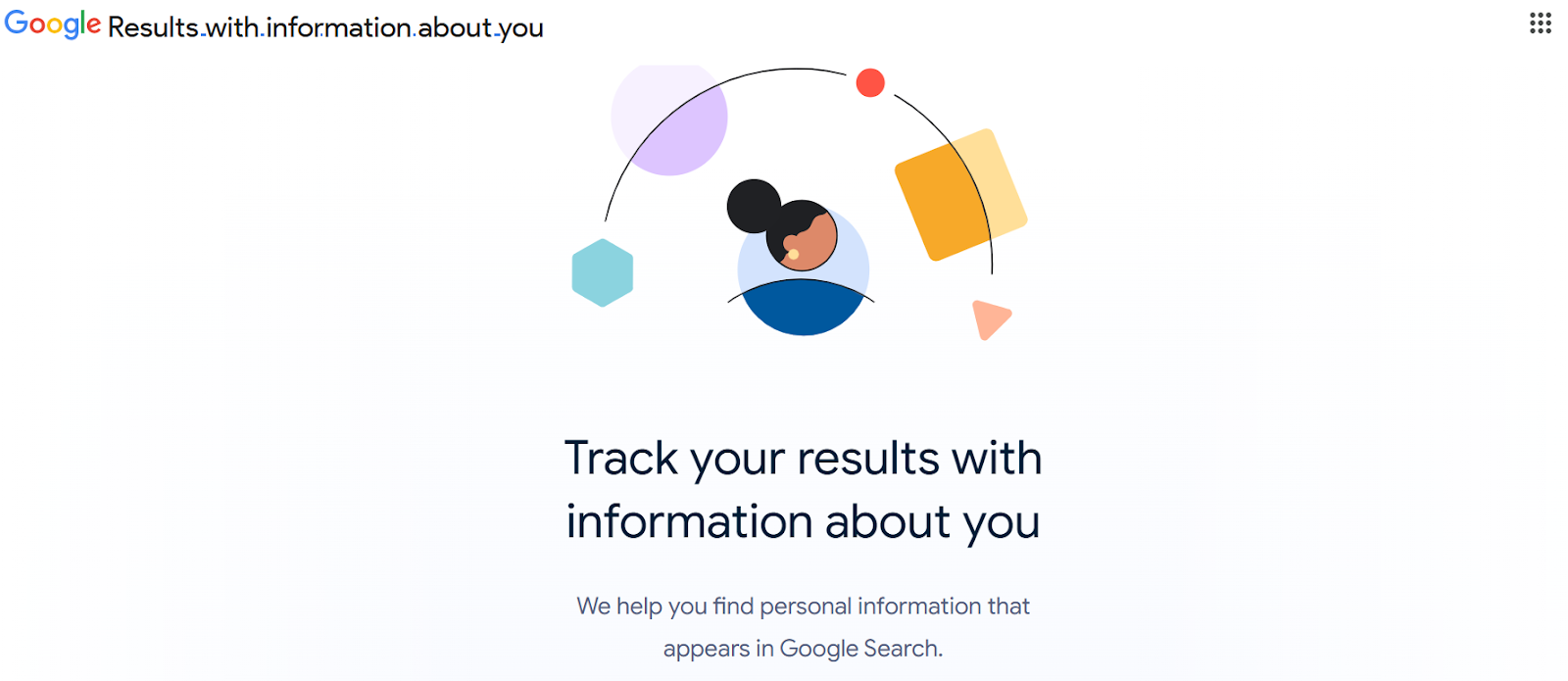
Once the page loads, you will be greeted by a clean, minimal interface designed to make the process as intuitive as possible. At the top of the screen, you will see the main heading, “Results about you,” placed above a short explanation of what the tool does. Typically, Google summarizes this feature with a simple sentence such as: “See and remove results containing your personal information.”
Beneath this description, you will see the “Get Started” button. This button leads you into the setup process, where you will add your information, enable monitoring, and later request removals. It serves as the beginning of all tracking, scanning, and visibility-management activity. Once you click it, the results about you tool shifts into its guided onboarding sequence. It will show you exactly what you need to enter and how Google will use that information to protect your privacy.
2. Provide Your Personal Contact Details
To accurately identify where your personal information appears online, Google must first know exactly what to look for. This happens in the second step, where you will be prompted to enter all the details that you consider sensitive or personally identifiable.
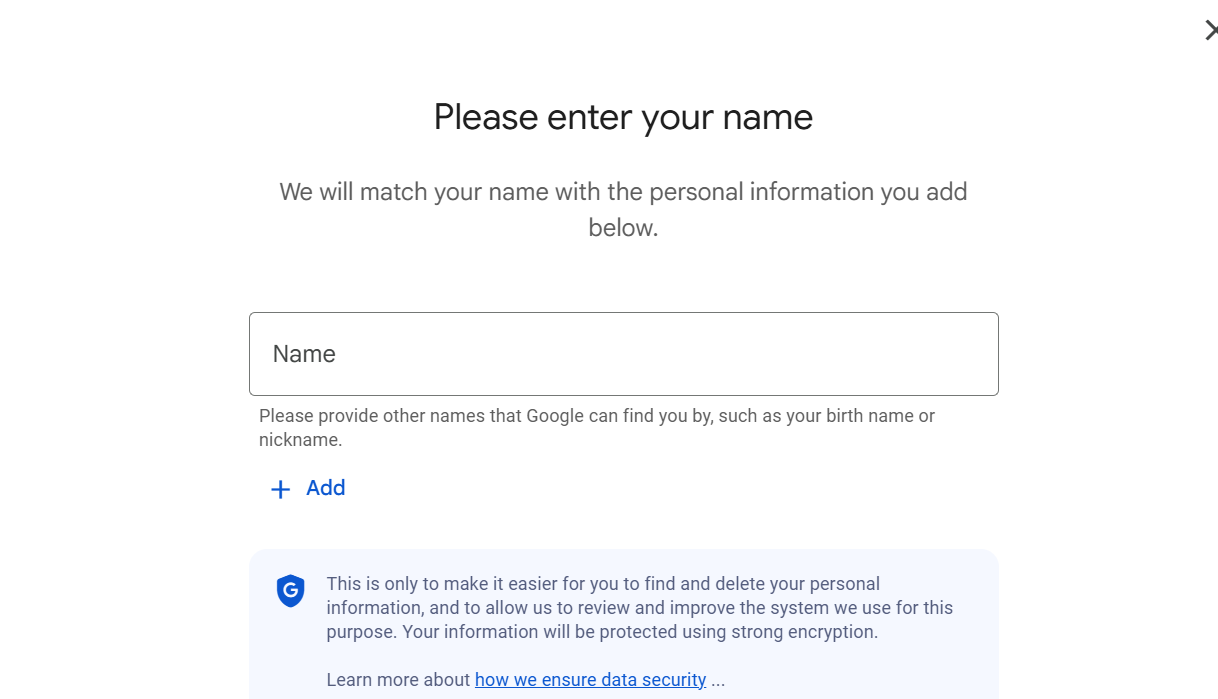
You will need to add:
- Your full legal name, as well as any commonly used variations.
- Your phone numbers, including mobile, work, old numbers you no longer use, etc.
- Current and past home addresses.
- Email addresses associated with you.
The more complete this list is, the more effective the scanning will be. Many people are surprised to discover how often outdated or inactive contact details appear on data-broker websites, old forums, or business directory listings. Entering multiple versions of your information ensures that the Google free tool results about you can detect all possible exposures.
After submitting all your data, you should click “Save and Continue.” This allows Google to begin searching publicly available websites for matching information. At this point, the system has enough data to monitor and detect content tied to your identity.
3. Turn on Personal Information Monitoring
Once you submit your personal details, Google will offer you the option to enable automatic monitoring. This choice significantly enhances the effectiveness of the tool. While manual searches are possible, automated monitoring ensures that you receive updates even when new exposures happen months or years after you originally shared the information.
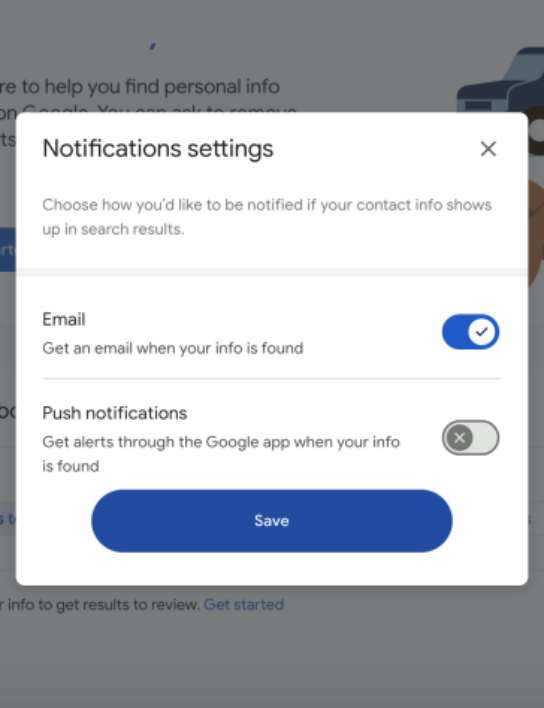
To activate it, you just need to toggle the monitoring switch into the “on” position. When enabled, Google continuously scans search results for new content that includes your personal identifiers. If anything new appears, you will receive a notification prompting you to review it and take action if necessary.
This option of the Google results about you removal tool is especially helpful because data exposure can be unpredictable. Old listings can be republished, scraped information can reappear on new websites, and breached databases may circulate online long after the original leak. Monitoring ensures you stay informed without manually checking your results every week.
4. Review What Can be Found in Google Search Results
You do not have to wonder how to see all results in Google because the engine will create a list of all webpages that contain your personal contact details. These findings are displayed as individual cards, and each represents a webpage where your data appears.
In most cases, these results come from:
- People-search directories;
- Public databases;
- Business listings;
- Old or abandoned online accounts;
- Scraped information aggregated by data brokers.
Each of these cards will show the website’s name and specify which type of information was found, such as “Contains: phone number” or “Contains: address”. Google will also offer you a “Request to Remove” button, which allows you to take direct action.
5. Send a Removal Request
When you choose to delete results about you Google, the engine will guide you through a brief form that asks why the content should be taken down. The most standard option is “It includes my personal information”, but the form also supports more urgent categories such as doxxing, safety threats, explicit content, and situations involving harassment.
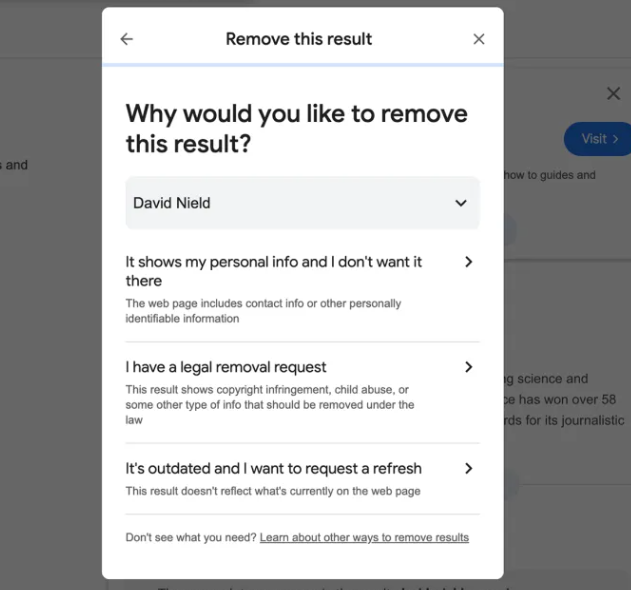
You might be asked whether the website belongs to you, whether you contacted the site owner, and whether the information causes a safety or privacy risk. These questions help Google prioritize and categorize your request. After you submit it, the review process begins. In many cases, removals are quick, but Google may need more time to evaluate the content or verify your claim.
6. Track Your Removal Status
After you submit the “remove Google search results about me request”, it will appear in the tracking section of the dashboard. Here you can view the status of every removal request you have made. Google uses a color-coded system to help you understand progress at a glance:
- Green for Approved.
- Yellow for In Progress.
- Red for Denied.
This tracking area is useful for managing multiple cases, especially if you have information listed on several different websites. Some outcomes may happen within hours, while others may take days, depending on the website and the nature of the request.
It’s important to note that for some users, all these mentioned steps can be an easy-peasy task, while for others, it’s quite a complicated and technical procedure. The same goes for the effectiveness of the results in the About You tool; some users are noting limitations.
What Can the Tool Help Me With?
Google’s revamped results about you tool is extremely useful for discovering phone numbers, addresses, and email addresses that appear on public websites. It also gives ordinary individuals the ability to manage their digital footprint in a way that used to require specialized knowledge.
At the same time, several limitations are important to understand before relying on it fully. For example, some results can’t be eligible for removal, since they are deemed to be of public interest, for example, on educational or some governmental websites.
First, the tool focuses exclusively on personal information. It does not erase harmful content, defamation, reputation damage, hacked images, social-media impersonation, or negative articles. It’s more about your personal info search queries, it’s also sometimes called query based removal. If the content does not qualify under Google’s strict definition of “personal information,” the request may be rejected.
Second, the Google search results about you tool does not operate equally across all regions. Some countries still cannot use the full monitoring system, while others receive only partial functionality. Yeah, some countries even have an age limitation of 18+ years for those who can submit requests.
Third, the tool hides content from Google Search, but it does not remove it from the internet. The website that posted your data remains online unless it chooses to cooperate. In many situations, Google will block the web page from appearing in search results, only for the same data to be republished by another site or directory later.
Finally, certain websites intentionally block Google’s scanner while still displaying your information to real users. This means your data is exposed even when Google cannot detect it. Because of these limitations, many people are sure that results about you tool Google is a good starting point, but it is never a complete solution.
Sometimes Professional Help to Request Removal Can Be the Only Solution
If your personal information continues to appear online after you use this function, or if the tool itself does not work in your country, professional assistance is the right solution. Some scenarios, such as leaked private content, false accusations, revenge exposure, or stolen intellectual property, require more advanced removal methods. Even though Google updated its results about you tool, this is a fact.
Professional teams can negotiate directly with website owners, file legal requests, get rid of deep-web copies, erase cached versions, submit DMCA notices, or perform full deindexing procedures across multiple platforms. These processes are extremely effective, but they require experience, relationships, and technical knowledge that you most probably do not have.
This is where NonDetected provides significant value. Our experts can not only use Google’s results about you tool, but they can also deal with harmful posts, negative articles, impersonations, leaked media, and any content that threatens your privacy or reputation. We work with websites directly, enforce compliance laws, remove content from search engines, and make sure that the material disappears completely, without being temporarily hidden from Google.
For many customers, the difference is the level of certainty. If you request Google about this result and ask for deletion, it may help, but NonDetected guarantees results with effortless elegance.
Start with Google – Finish with Experts’ Help If Needed
What is results about you tool? It is one of the most accessible ways to monitor and reduce exposure of personal information online. It is simple, fast, and effective for basic issues, such as directory listings, data-broker pages, and outdated public records. At the same time, it has clear limitations. It cannot remove harmful or defamatory content, cannot reach every country, and cannot delete content from the source.
If the tool solves your issue, then you have a guide in this article. If it does not or if what you found online is harmful, sensitive, or malicious, NonDetected is ready to step in and ensure your information is removed fully and permanently. There is no need to wait until things escalate, as you can just contact professionals, and they will do everything for you.


